Create your first automation
An automation answers comments, DMs or story replies for you, day and night. This guide builds a classic “comment GUIDE to get the link” in about 5 minutes.
Steps
Open Automations
Click Automations under Automate, then New automation. To save time, click Templates and click a card, for example Free guide for a comment. The editor opens already filled in, and you can change everything.

Templates panel with ready made automations Give it a name
Type an Automation name only you will see, for example “Free guide Reel”.
Choose What starts it
Under What starts it pick one:
Option When it runs Specific post Someone comments on one post or Reel you pick Any post Someone comments on any of your posts Next post Someone comments on the next post you publish DM keyword Someone sends you a DM with your keyword First DM Once per person, on the very first DM they ever send you Story reply Someone replies to any of your stories Story mention Someone mentions you in their story Conversation starter A question shown in an empty chat; tapping it starts the automation 
What starts it options in the automation editor Add keywords
Under Which comments get a reply type the words people will comment or send, for example GUIDE. Press Enter after each one. Matching ignores capital letters and emojis, and works in Hindi and Hinglish too. To answer every comment, turn on Reply to every comment on this post. Words in Do not reply if the comment contains any of these words are skipped.
Write the public reply
Under Public reply under the comment add 2 or 3 short versions with + Add variant, for example “Sent! Check your DMs”. PostToDM rotates them so replies look natural.
Write the Opening DM and button
In Opening DM write the first private message and a button label, for example “Send me the link”. When they tap it, they get What they get: Message with button or Card with image. Paste your link in Link people will open.
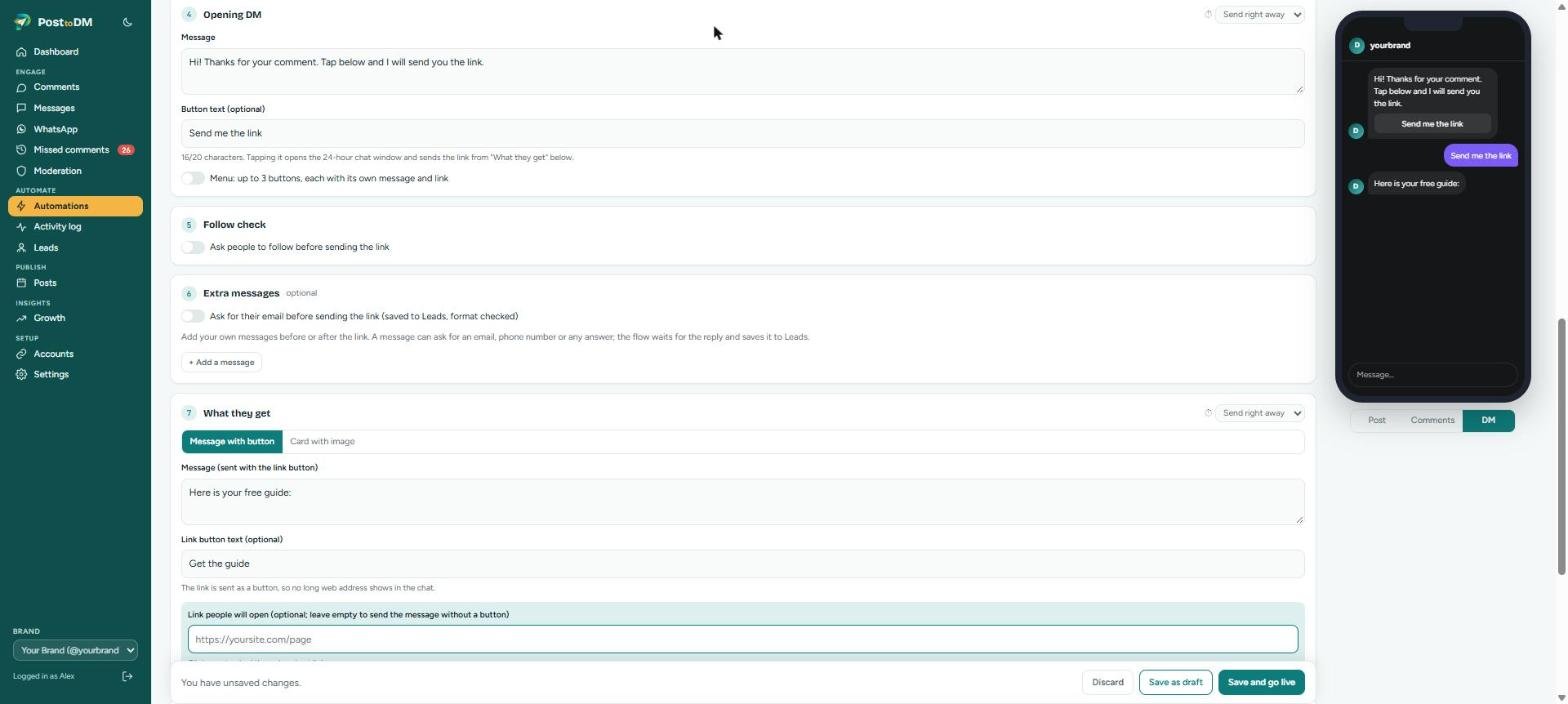
Opening DM with a button and the phone preview on the right Optional: Follow check
Under Follow check turn on Ask people to follow before sending the link to ask people to follow you before they get the link. If they still do not follow after one reminder, PostToDM sends the link anyway. This keeps you within Instagram rules.
Save and go live
Check the preview, then click Save and go live. To keep it off for now, click Save as draft. The status shows Live or Draft in the list.

Automations list with the new automation marked Live Test it
Ask a friend (not your own account) to comment your keyword. Within a minute they should get the reply and the DM. Check Activity log to see each step. Your own comments are ignored on purpose.
AI replies to DMs
AI replies answer DMs that match no automation, using only notes you write. Go to Settings, the Alerts tab, AI replies to DMs, tick Answer unmatched DMs with AI, paste your notes (courses, fees, timings, links) and click Save AI replies. If the answer is not in your notes, the AI stays quiet and the chat waits for your team. At most 5 AI replies an hour per person. Available on Pro.

Built in safety
- People can reply STOP to stop automated DMs, and START to turn them back on.
- When you or your team reply to someone by hand, automated DMs to that person pause (1 hour by default; change it in Settings, Alerts tab).
- One private reply per comment, sent within 7 days of the comment, as Instagram requires.
Common questions
How fast is the DM sent?
Usually within a few seconds to a minute. PostToDM adds a short random wait so it looks natural and stays inside Instagram limits.
Why did my own comment not get a DM?
Comments from your own account are ignored so the automation does not reply to itself. Test with another account.
Can one post have several automations?
Yes, with different keywords. A comment gets the first automation whose keyword matches.
Does it work on Facebook Pages too?
Comment automations can run on a connected Facebook Page. Facebook skips the follow check, extra messages and the menu.